Every stitch, measured.

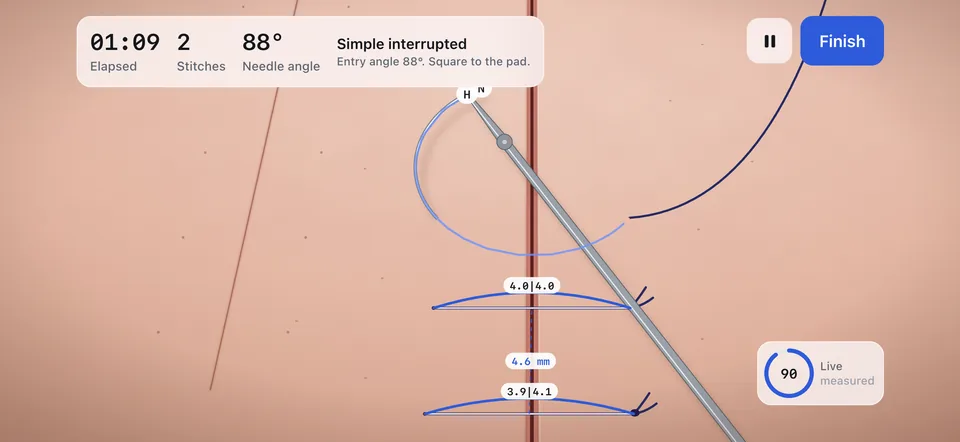
SuturePro during a practice session. Two finished stitches cross an incision on a practice pad, each labelled with its bite distances in millimetres, while a needle holder drives the next stitch and the app reads the needle angle as 88 degrees.

An iPhone app for suturing practice. Stand your phone by the pad: SuturePro measures each stitch in millimetres and writes an AI coaching review when you finish.

Watch the trailer
  • Coming soon
  • iPhone, iOS 17 or later

Trailer · 0:22

A practice session, start to finish.

Twenty-two seconds: a few stitches, one shallow needle entry, and the review that follows.

The trailer is an illustration. The camera view is drawn and the session shown is sample data. It has music and no speech.

Features

Feedback in millimetres, not adjectives.

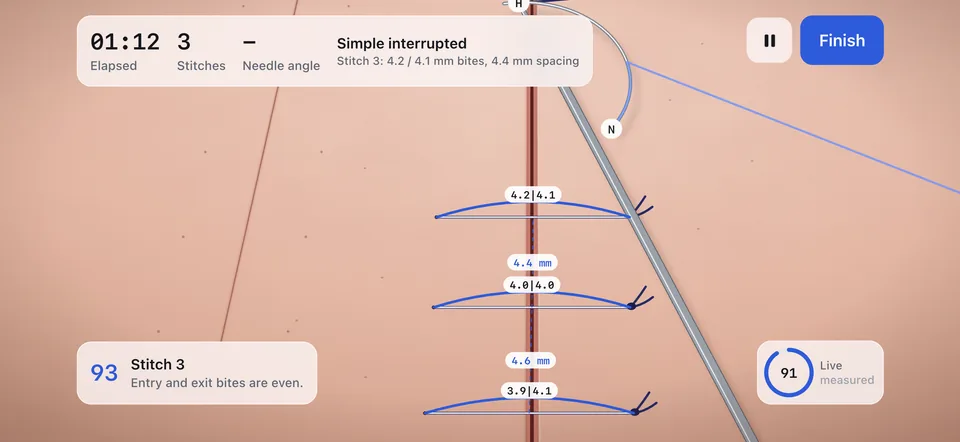
Live session screen. Three stitches on the pad are labelled 4.2 | 4.1, 4.0 | 4.0 and 3.9 | 4.1 millimetres, with 4.4 and 4.6 millimetre spacing between them. A card reads: 93, Stitch 3, entry and exit bites are even.

01 · On the pad

Each stitch, measured after you tie it.

Tie a stitch and move your hands away. SuturePro reads the thread on the pad and reports the bite on each side of the incision, how even the two bites are, and the spacing to the stitch before.

Entry | exit bite
4.2 | 4.1 mm
Spacing
4.4 mm
Stitch score
93
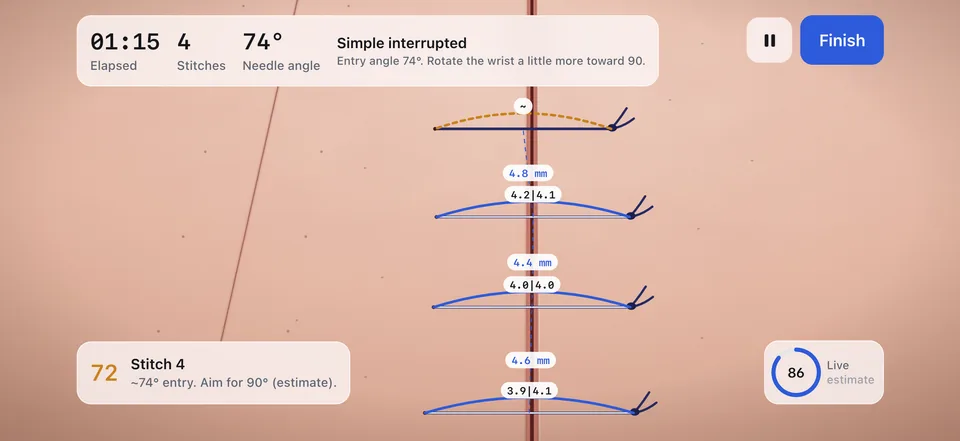
Live session screen after a shallow needle entry. The status bar reads: needle angle 74 degrees, rotate the wrist a little more toward 90. The fourth stitch is drawn dashed in amber, and a card reads: 72, Stitch 4, about 74 degrees entry, aim for 90 degrees, estimate.

02 · As you drive

Needle angle, estimated as you drive.

SuturePro estimates how squarely the needle meets the pad and tells you when an entry is shallow. A stitch scored from an estimate is drawn dashed and marked with a ~, so you can tell it apart from one that was measured.

Entry angle (estimate)
~74°
Target
90°
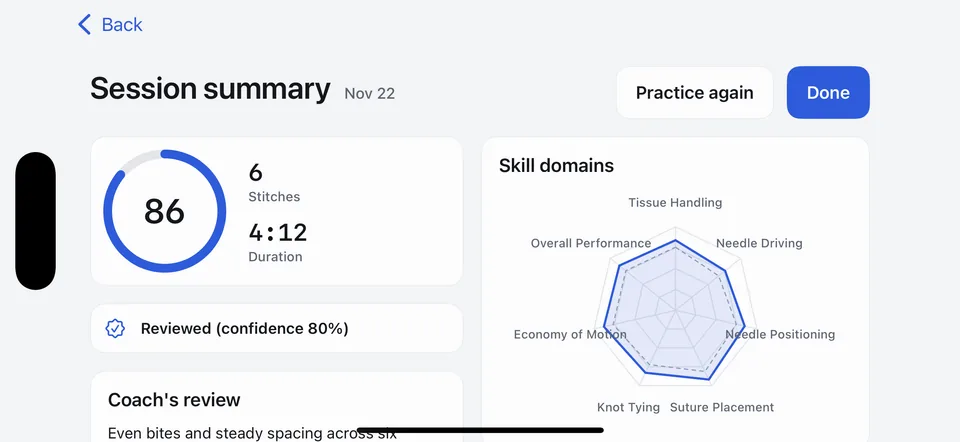
Session summary screen. An overall score of 86 for six stitches in 4 minutes 12 seconds, marked Reviewed, confidence 80 percent. A radar chart plots seven skill domains against a dashed outline of the average from earlier sessions.

03 · When you finish

The session, scored by skill domain.

The summary opens as soon as you finish: an overall score, a score for each stitch, and a radar across seven skill domains, drawn against your own average from earlier sessions.

Session score
86
Stitches
6
Duration
4:12
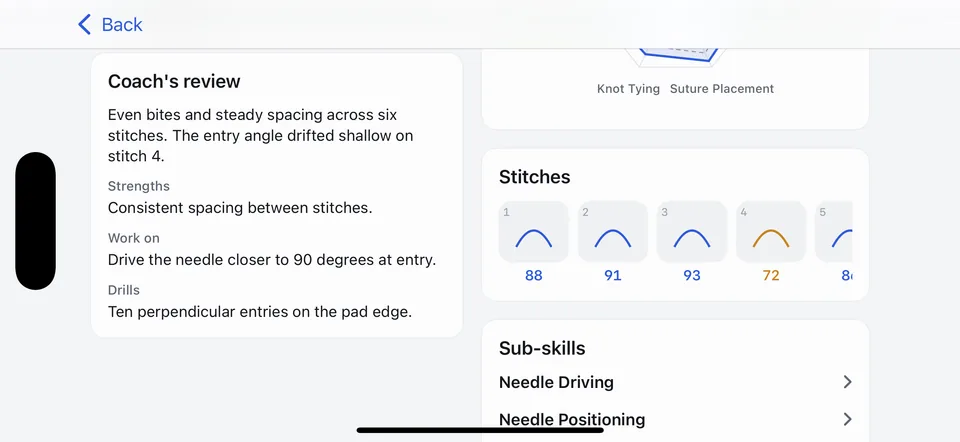
Session summary scrolled to the Coach's review card. It reads: even bites and steady spacing across six stitches; the entry angle drifted shallow on stitch 4. Strengths: consistent spacing between stitches. Work on: drive the needle closer to 90 degrees at entry. Drills: ten perpendicular entries on the pad edge. Beside it, stitch cards score 88, 91, 93 and, in amber, 72.

04 · After the review

A written review of the session.

If you choose to upload a session, an AI model (Claude, made by Anthropic) reviews frames from your recording and a photo of the finished pad. It writes what went well, what to work on, and a drill to try. The review is optional; the measurements on the pad work without it.

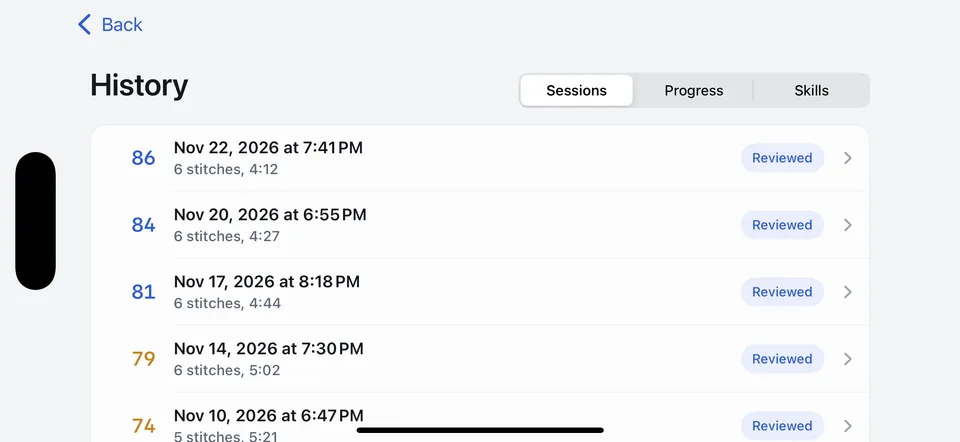
History screen with tabs for Sessions, Progress and Skills. The session list shows scores of 86, 84, 81, 79 and 74, each with its date, stitch count, duration and a Reviewed label.

05 · Over time

Every session, kept on your phone.

Each session is saved on your phone with its score, stitch count and duration. A progress view charts your scores from one session to the next.

Every screen shows sample data. The camera view in the two live-session screens is an illustration. The summary, review and history screens are captures of the app running in the iOS Simulator.

How it works

A phone, a stand and your practice pad.

  1. Stand the phone

    Landscape on a stand, tilted about 45° toward the pad. A guided check confirms the angle and the lighting before you start.

  2. Mark the incision

    Drag two handles onto the ends of the incision, then keep your hands clear while the app captures the clean pad.

  3. Suture

    Place your stitches. Each one is measured after you tie it, and the written review follows when you finish.

Details

Good to know.

SuturePro is still being built. This is where it stands today.

Status
In development. There is no release date yet.
You need
An iPhone with iOS 17 or later and a phone stand. Pro models with LiDAR are recommended.
Works with
The suture practice pad and instruments you already have. No markers or tape on your tools.
Technique
Simple interrupted sutures on a straight incision.
Recording
Sessions are recorded as video, without sound. You choose whether that video leaves your phone for the review.
What it is not
SuturePro is a training tool for practice pads, not a medical device. Its scores and feedback come from software and an AI model. They have not been validated against expert raters and are not an assessment of competence.

Coming soon

Coming soon for iPhone.

Until then, the trailer is the best look at how a session works.

Watch the trailer